


Description
Download Cliqz – Privacy‑Focused Browser, Fast Search, Secure Browsing
Overview
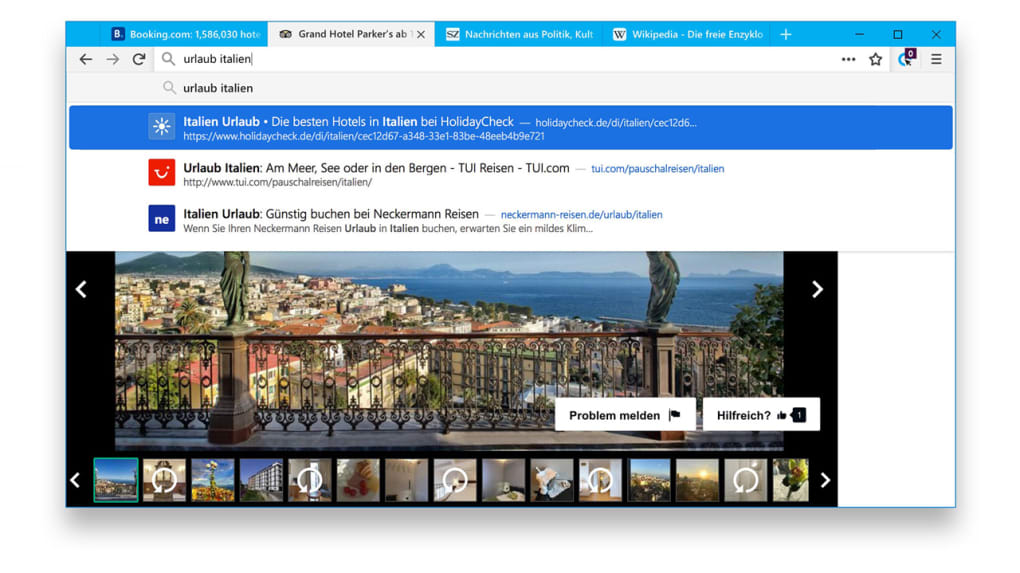
Cliqz is an indie web browser that originated in Germany and is built around the principle of privacy‑first browsing. Unlike the mainstream browsers that rely on massive data collection to fuel advertising engines, Cliqz integrates its own real‑time search engine directly into the address bar, delivering results without sending your keystrokes to third‑party servers. The interface is intentionally minimalistic: a clean address bar, a simple tab system, and a built‑in ad blocker that works out of the box. For users who have grown weary of invasive trackers, hidden cookies, and algorithmic profiling, Cliqz offers a refreshing alternative that balances speed, usability, and security. While the browser lacks the extensive library of extensions and themes that powerhouses like Chrome or Firefox enjoy, its core mission—protecting user data—remains uncompromised. Cliqz is continuously updated to patch vulnerabilities, improve performance, and refine its anti‑tracking technology, making it a reliable choice for privacy‑savvy individuals who want a straightforward, efficient way to surf the web.
Key Features
- Integrated Real‑Time Search: Search results appear instantly as you type, without routing queries through external search engines.
- Built‑In Anti‑Tracking: Advanced fingerprinting protection blocks invisible trackers, preventing advertisers from building detailed profiles.
- Ad & Malware Blocking: Automatic blocking of intrusive ads and known malicious sites keeps your browsing experience clean and safe.
- Smart Tracker Blocker: Uses a constantly updated list of trackers to eliminate third‑party cookies and scripts.
- Secure HTTPS‑Only Mode: Forces encrypted connections whenever possible, reducing the risk of eavesdropping.
- Lightweight Design: Minimal UI elements and no heavy extension ecosystem keep memory usage low and page load times fast.
- Private Browsing with Automatic Data Wipe: Sessions can be set to erase history, cookies, and cache the moment the window is closed.
- Regular Automatic Updates: Security patches and feature enhancements are delivered silently in the background.
Installation, Setup & Compatibility
Getting started with Cliqz is straightforward. Visit the official website, click the Download button that matches your operating system, and follow the on‑screen installer prompts. The installer is signed with a valid code‑signing certificate, ensuring that the download is authentic and free from tampering.
Step‑by‑Step Installation
- Navigate to cliqz.com and select “Download for Windows”, “Download for macOS”, “Download for Android”, or “Download for iOS”.
- Save the installer file to your computer or mobile device.
- Run the installer and accept the license agreement.
- Choose your preferred installation folder (Windows) or allow the app to install in the default location (macOS, mobile).
- Finish the wizard and launch Cliqz. The first launch will walk you through a quick privacy configuration wizard.
Supported Operating Systems
Cliqz is officially supported on Windows 10/11, macOS 10.14 and later, Android 8.0+, and iOS 13+. The developers maintain separate binaries for each platform to ensure optimal performance and security compliance.
On desktop, the browser uses the Chromium rendering engine, which guarantees compatibility with modern web standards, HTML5, CSS3, and JavaScript ES2020. Mobile versions are built on native WebView components, offering the same speed and stability as the desktop counterpart while respecting the constraints of mobile hardware.
After installation, the initial setup wizard asks you to choose a default search engine (Cliqz’s own engine is pre‑selected), configure your privacy level (Standard, Strict, or Custom), and decide whether to import bookmarks from another browser. All settings are stored locally; no user data is transmitted to remote servers unless you enable optional synchronization features.
Pros, Cons, Frequently Asked Questions & Final Verdict
Pros
- Strong built‑in privacy and anti‑tracking tools.
- Integrated, fast, real‑time search without third‑party data leakage.
- Lightweight and fast loading times due to minimal UI.
- Regular security updates and transparent development roadmap.
- Cross‑platform availability (Windows, macOS, Android, iOS).
Cons
- Limited extension ecosystem compared to Chrome or Firefox.
- Fewer customization options such as themes or UI tweaks.
- Search results may differ from major engines in relevance for niche queries.
- Smaller user community means fewer third‑party tutorials and support forums.
Frequently Asked Questions
Is Cliqz completely free to use?
Yes, Cliqz is offered as a free download with no hidden subscription fees. Optional premium features, such as cloud‑based sync, may be introduced in the future, but the core browser remains free.
How does Cliqz protect my data from trackers?
Cliqz uses a combination of fingerprinting protection, third‑party cookie blocking, and a constantly updated tracker list. It also isolates scripts in a sandboxed environment to prevent data leakage.
Can I import bookmarks from Chrome or Firefox?
During the initial setup, Cliqz provides an import wizard that detects existing browsers on your system and allows you to transfer bookmarks, saved passwords, and history with a single click.
Is the built‑in search engine as reliable as Google?
Cliqz’s search engine focuses on speed and privacy rather than sheer index size. For everyday queries it delivers accurate results, but for highly specific or niche searches you may prefer a secondary engine.
Does Cliqz support extensions at all?
Cliqz supports a limited set of Chromium‑compatible extensions, but the official store is smaller than Chrome’s. Users can manually add .crx files, though this may reduce the privacy guarantees of the browser.
Conclusion & Call to Action
Overall, Cliqz stands out as a solid choice for users who prioritize privacy without sacrificing speed. Its integrated search, built‑in tracker blocker, and lightweight design make it an appealing alternative to the mainstream browsers that have grown bloated with data‑harvesting features. While the lack of a robust extension ecosystem may deter power users, the trade‑off is a cleaner, more secure browsing experience that respects your digital footprint. If you’ve been looking for a browser that puts you back in control of your data, give Cliqz a try today.
Ready to browse securely? Download Cliqz now and experience a faster, private web without compromising on performance.
Guides & Tutorials for Cliqz
How to install Cliqz
- Click the Preview / Download button above.
- Once redirected, accept the terms and click Install.
- Wait for the Cliqz download to finish on your device.
How to use Cliqz
This software is primarily used for its core features described above. Open the app after installation to explore its capabilities.
User Reviews for Cliqz 0
No reviews found





